Xoradora
Load a sample, resynthesise it using one of seven sound models to reshape it in ways both subtle and extreme
About
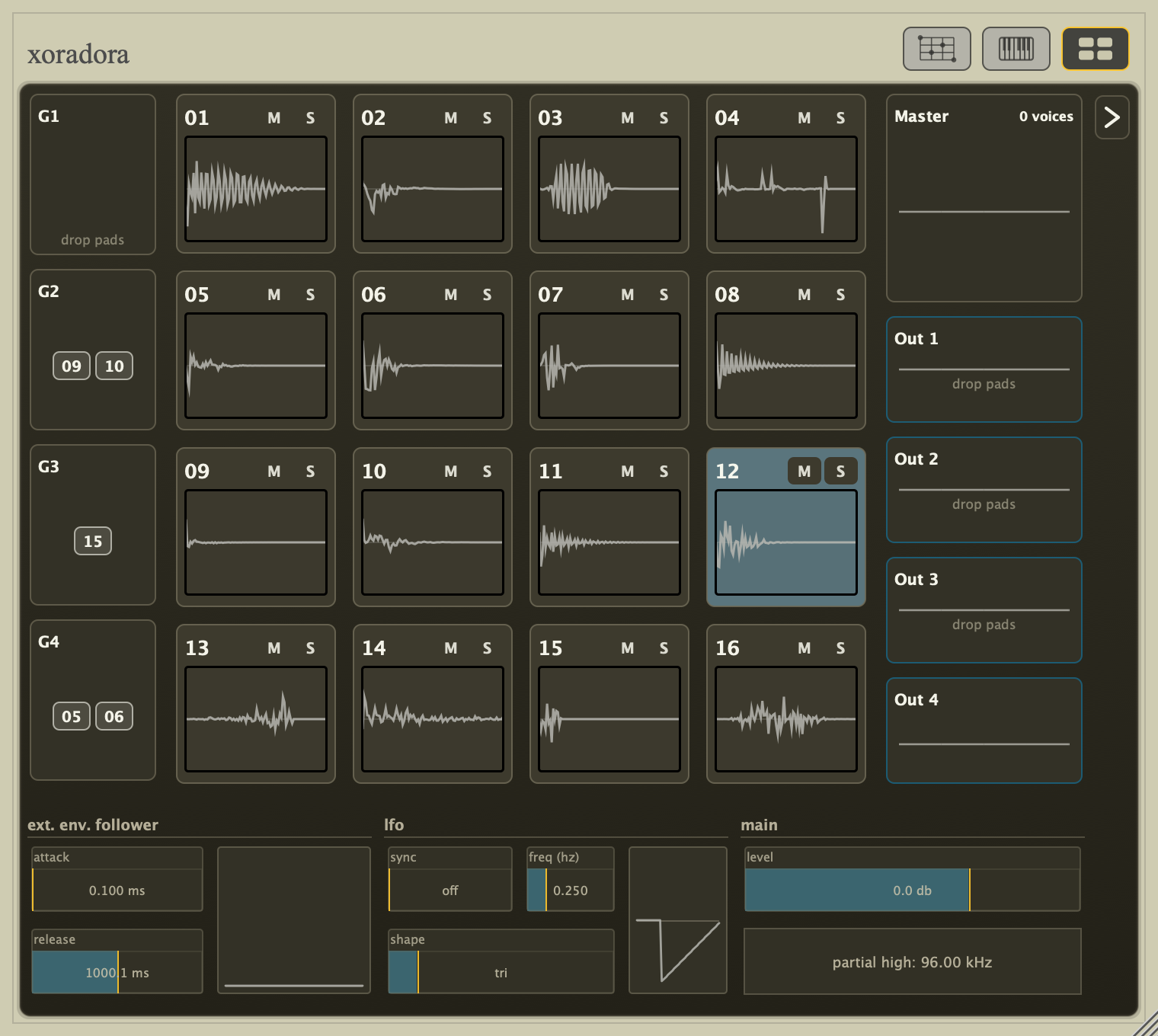
Xoradora is a drum machine designed for resynthesising drum sounds from samples. Depending on your goals and the model used, you can tweak drums slightly - as if changing the shape of the resonating body, or the interaction between the different physical elements which comprise it - or you can tear them apart entirely to be reformed into novel alien sounds or rhythmic sources.
Xoradora is currently in public beta, priced at €44 / $49 USD. The price will increase when Xoradora reaches 1.0.
Seven models provide distinctly different ways of analysing and resynthesising your samples. For each model, a different set of parameters allow you to alter aspects of the model, with many of the parameters also being valid targets for modulation by LFO or an envelope follower on an external audio source.
Each model resynthesises the source as if from scratch, rather than altering it via a post-processing filter or effect. At neutral settings the original character remains almost identical. Move away from neutral and the same sample can adopt a different shell, impact, texture, or gesture. The resynthesis models offer a great breadth of sound design possibilities and are extremely flexible. The drum machine focuses on this dry resynthesis rather than nifty post processing or filters. As a result, the only effect-like parameters included in this release are output saturation and a per-voice "Voice Ceiling" - to keep the experimentation mostly safe to transient signals when using extreme modifications. The non-Warp modes also have a pre-saturation trim control in their Guided/Advanced view for extra headroom.
In the standalone app there is also a ducking compressor with side-chaining. This is meant more for messing around with sounds without a DAW or getting a feel for the drum machine. Like the built-in sequencer, it is by no means intended as a replacement for what you would find in a plugin host, but the patterns and settings are saved with kits so they help you create a demo for your kits if you so wish.
Everyone probably has their own tricks for incorporating drums into a mix. Side-chaining, reverb & delay sends - the VST3 and CLAP versions offer a main stereo output and four auxiliary stereo buses for those workflows. The Audio Unit exposes the main stereo output; Standalone mixes all five routes into its stereo device output. Xoradora aims to do one thing (albeit 7 different ways) and to do it very well.
Development background
At the start of the year, I began resuscitating my "Macomate 88" effect/synth for re-release with some nifty new features, but I wanted to have a sound source that I could use in demos, and (for reasons I now don't remember) I wanted a drum machine.
The drum machines I used to use, excellent though they are, are no longer maintained - and I decided (probably as procrastination, because releasing stuff is painful) to instead make my own drum machine. 26 years ago I was processing drum samples offline in Matlab; now - with faster processors, a large collection of signal processing bits and pieces I've tinkered on over the years, and more programming experience myself - it should be possible to re-realise those (then) painfully slow experiments in a drum machine/resynthesiser with the sort of workflow I would like to use myself to create music.
See Xoradora in action
Seven models
Each model analyses the structure of the source sample from a different perspective. The models are described here in broad strokes, with diagrams showing which parts of a sound can be altered. Muted grey lines show material found in the source; blue lines show the reshaped model. Gold marks transients such as attacks and short sound slices. If a description is unclear or you would like more detail, please let me know.
Warp — attack and body
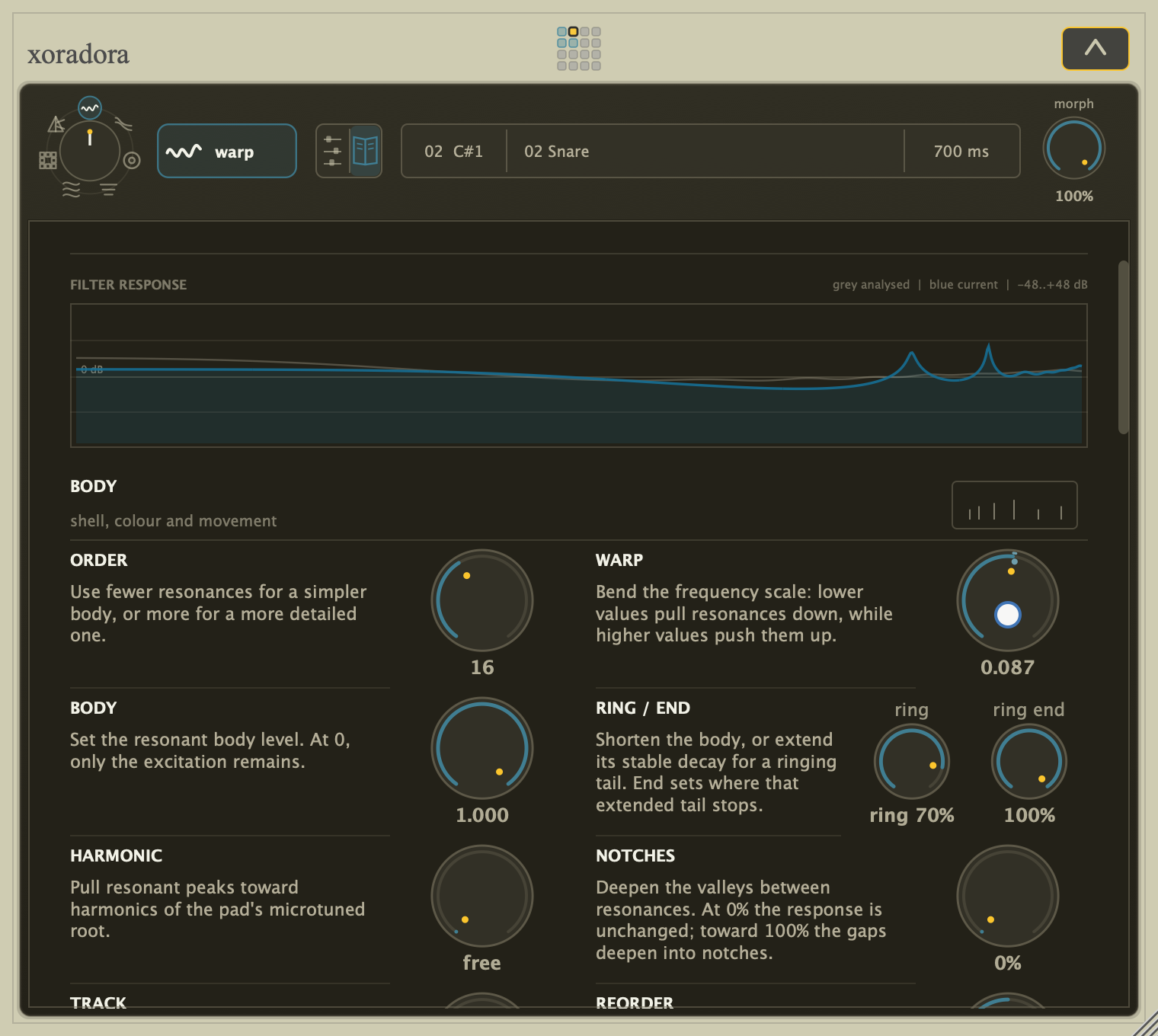
Warp separates the strike from the changing body of a hit. The attack can stay recognisable while you simplify or complicate the body, change its motion, or push it into something physically implausible. It is especially good at turning one shell, cavity, or thump into another.
Move the excitation and model independently, or use Coefficient Stretch to slow or reverse the changing body without stretching the strike. Noise can keep driving the body after the recorded excitation fades; AGC brings quieter excitation forward.
Halo — colour and detail
Halo separates broad colour/spectral outline from the fine texture that gives a sound its grain. Flatten or exaggerate that colour, make it more or less detailed, use Freeze to hold it at one moment, or stretch its movement through time while the finer character remains present. Carrier and Colour have separate placement controls, so the texture and its changing spectral outline need not arrive together.
Hull — ringing body and impact
Hull follows the decaying tones inside a hit while keeping the attack and noise separate. Tune, spread, damp, extend, or destabilise the ringing body without dragging the rest of the sound along with it. Shells, plates, bells, toms, and other ringing material become directly tunable. Body and Residual can also be placed and looped independently: keep the impact where it belongs while moving the ringing body around it.
Prism — bands in motion
Prism follows the low, middle, and high movement inside a hit. The fast texture and slower shape of each region can move separately, so gestures can stretch, stagger, smooth, exchange character, or drift toward noise without simply filtering the finished sample.
Grain — overlapping slices
Grain rebuilds the sound from short, overlapping slices. They can be thinned, held, smeared, folded, or punctured with holes; attack and pre-echo controls decide how much of the original strike survives. The result is musical digital damage rather than an MP3 effect placed after playback.
Source and Pattern have their own placements and loops. Repeat a short damage pattern over different source material, or let the pattern finish while the source continues. Holes and Hold can be shaped during playback.
Strata — learned musical roles
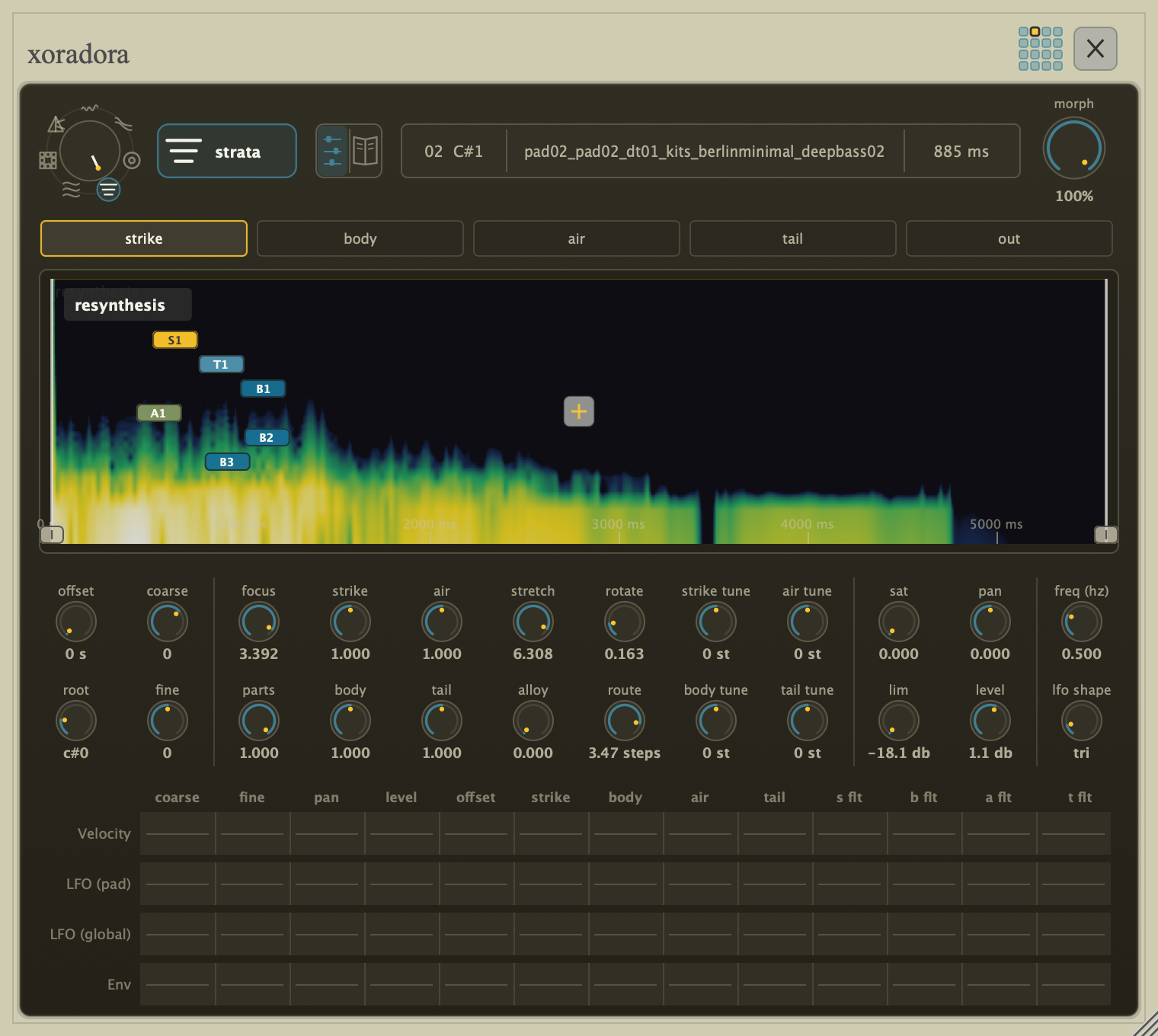
Strata learns several short patterns from a hit and groups them into strike, body, air, and tail. Balance those roles independently, change how clearly they separate, stretch or scatter their movement, and exchange their shapes and timelines. It treats the sound as a collection of percussive events rather than one solid object.
Strand — tone, attacks, and noise
Strand separates stable pitched tones, short attacks, and coloured noise. Retune or reharmonise the tone, move and sharpen the attacks, reshape the noise colour, and give tone and noise independent decay, stretch, or reverse timelines. Its normal live tier follows 24 tones, with an optional 48-tone HQ mode for dense metallic material.
Guided mode
"Guided mode" provides a scrollable view for the mode where each parameter has a short description. You can enter the Guided view from the default Compact view via context menu, pressing H or the TAB key on desktop or by pressing the button above the waveform/spectrogram display to left of the sample name.
Controls in the Guided view are grouped by musical purpose and are fully interactive. In addition, at the top of the guided there is a visualisation of the mode: Warp shows the resonances and notches in the changing frequency response, Halo the broad colour, Hull the ringing tones, Prism the band motion, Grain the sound slices, Strata the parts in time, and Strand its three layers.
The timing displays are editable. Drag placement flags and loop edges, follow the coloured playback cursors, and open a loop's crossfade popover to choose One-shot or Loop, set its repeat count and adjust the join. The same sound can use one Shared loop or independent component loops. Choose Infinite for an evolving texture, or a finite number of repeats followed by the remaining sound. The manual's looping workflow explains the count and timing rules.
For modes where not all parameters could be contained within the compact view, the Guided view also contains these "overflow" parameters.
Play and record from your phone
Standalone's Phone Link turns a phone on the same local network into a pad controller and sequencer remote. Pad waveforms and sample names help identify sounds; active-loop indicators and Stop all make sustained loops easier to manage.
With macOS Standalone, experimental phone recording also lets you capture a take, preview and trim it, then send it straight to a pad with undo support. Recording depends on browser microphone permission and trust for the Mac's local HTTPS page; physical iPhone/Safari recording validation is still pending. See the Phone Link workflow for setup and limitations.
Built for exploration
- Audition the original and resynthesised sound side by side.
- Learn how each model works in the interactive "Guided view".
- Place and loop components independently, with finite or unlimited repeats.
- Copy a complete pad with clipboard shortcuts or a modifier-drag, then undo the replacement if needed.
- Use an interactive evolution to audition variations and breed the sounds you want.
- Animate model-specific controls with envelopes and per-hit movement.
- Bounce a transformed pad in place, to another pad, or to an audio file, then reshape it again.
- Tune the result to standard or alternative microtonal scales.
Formats
- macOS: VST3, AU, CLAP and Standalone
- Windows: VST3, CLAP and Standalone
- Linux: VST3, CLAP, LV2 and Standalone (experimental)
Downloads
Free to try. Trial mode pauses audio for 5 seconds at random 15–20 minute intervals; the first 15 minutes are uninterrupted.
* Linux is very experimental and currently not supported. The Linux build is available for testing only and may have limited host coverage compared with the macOS and Windows releases.
Older versions
Changelog
Version 1.0.0-rc.3 (2026-11-01)
Highlights
- More expressive envelopes: independent lengths and delays across all seven modes, new tone-shaping envelopes in Strata, Strand and Hull, and bipolar Colour in Halo. Guided view adds stacked envelope plots for editing and comparing several curves together.
- New Warp model controls: Model Slew, interpolated or stepped targets, and envelopes that can shape the Ring tail.
- Lower playback CPU: reduced note-start spikes in Warp, Halo, Prism and Strand, plus more efficient Hull mode shaping.
- Simpler Phone Link pairing: trusted HTTPS QR links replace the self-signed certificate step.
- Playback and host fixes: smoother Hull resonances, more reliable Warp retriggers and saved settings, and improved AU/CLAP compatibility.
Detailed changelog
-
Fixed a Linux LV2 crash when optional Envelope Input channels are disconnected, including changes between audio blocks.
-
Reorganized pad, detail and Sequencer menus with consistent View and desktop Settings access, clearer shortcut hints, and separated clear/reset actions. Sample editing and copy/paste actions are grouped; template-copy and evolution destinations use one submenu level. External-edit recovery actions appear only when an edit is pending.
-
Added Show tooltips in desktop Settings, enabled by default. Turn hover help on or off throughout Xoradora; your choice is remembered on this computer. Settings is available directly from every main editing screen.
-
Improved host compatibility: AU reports its initial preset correctly and retains Prism Band Skew's exact maximum; CLAP reports invalid saved state as rejected while preserving the current session.
-
Smoothed delayed Hull resonances so independent Body loops no longer repeat abrupt onset clicks. Also fixed zipper-like distortion in slowly changing resonances.
-
Fixed envelope curves displaying the wrong Follow length or delay, and Warp playback sparks drifting behind the model cursor around loop crossfades.
-
Compact view places its time axis below the waveform or spectrogram. Drag its labels to pan, matching Guided's timeline navigation, or double-click either view's time-axis labels to fit. Fit also remains in the context menu. On macOS, two-finger swipes scroll and pinching zooms around the pointer.
-
Morph flashes when opening mutation with M below 50%, drawing attention to the reduced strength of sound changes.
-
Matching simultaneous Independent Halo notes share their initial preparation, reducing first-buffer CPU spikes while preserving onset and independent playback. Windows playback gains further startup headroom.
-
Removed an invalid memory write from Prism's filter bank.
-
Warp prepares moving filter targets ahead of playback for Shared and Independent loops and non-looping notes, reducing bursts of work at small audio buffers while preserving the sound and timing. Matching overlapping hits share preparation, and Independent loops retain more prepared targets and prepare their starting filters before note-on. Starting notes across all modes does less unnecessary setup, with further reductions for Prism and Strand, including when several notes arrive together. Strand also prepares its playback paths in the background to reduce first-note spikes. Tracked Warp reduces CPU spikes as its model changes.
-
Strata gains a bipolar Colour envelope for each role. Strand gains Spread, Harmonic and Partial Tune envelopes, and Hull gains Spread, High Damp and Pitch Variation. The centre preserves the knob setting; lower and upper points move it in either direction. All envelope selectors stay in one row, sharing it with the loop controls at the default desktop size. Labels abbreviate where needed, with full names in tooltips.
-
Hull uses less CPU when shaping its modes across Duration settings, including with the new envelopes disabled. Sustained notes and loops gain the saving as soon as preparation finishes, with a smooth transition that preserves playback and envelope timing.
-
Halo's Colour envelope now has positive and negative bias around a neutral centre, so it can deepen the colour as well as thin it. The centre leaves the Colour knob unchanged.
-
Guided view gains stacked envelope plots and synchronised timeline navigation. Drag the time-axis labels to pan component timelines, loops and envelopes together, or use macOS trackpad gestures to pan and zoom. See which curves are active and keep several open for comparison. Drag nearby points together to merge them, with undo.
-
Envelopes gain independent lengths and delays in seconds or beats across all seven modes, with horizontal timing sliders and exact numeric entry tucked into the selected envelope tab. Dragging the last point beyond its current length extends the duration while keeping earlier points in place. Switching between Follow, Time and Beats preserves the curve's shape and placement. Every enabled curve shows playback sparks, including Follow envelopes. Strand's component curves are stored independently from other modes.
-
Warp's Follow envelopes can shape and loop through the Ring tail. Changing Ring preserves earlier envelope timings, and playback sparks stay visible when a curve is edited. The timing icon also has more space inside its tab.
-
Warp gains Model Slew and interpolated/stepped model targets, with the Guided controls arranged in two rows beside their description. Stepped targets retain smoothing, and harmonic tracking now settles to held targets instead of getting stuck between frequencies.
-
Warp retriggers and Gate Release behave consistently when voices are reused. Saved Warp settings restore without rounding drift.
-
Compact layer offset and loop labels keep their vertical order when avoiding collisions, so High stays above the middle and Low layers.
-
Phone Link now pairs through a trusted HTTPS QR link, removing the local self-signed certificate step. Pads, sequencer controls, and trimmed recordings travel directly between the phone and desktop. Initial pairing needs internet access and both devices on the same Wi-Fi.
-
Simplified Guided loop menus to Layer independent loop and Shared loop, with the current choice checked. Removed the ambiguous range-limit command from Guided view; an existing range limit can still be removed there.
- Removed duplicate Guided offset knobs and banks in all seven modes; edit individual layer placements directly on the timeline.
- Grouped Strata's Guided timeline layers by Strike, Body, Air and Tail, keeping each role's layers together.
- Drag the middle of a Guided loop area to move the whole loop, preserving its length and crossfade and stopping at playable boundaries.
Version 1.0.0-rc.2 (2026-10-25)
RC2 is available for macOS and Windows, with an experimental Linux build.
- Finite loop repeats: choose how many times Shared or individual-layer loops repeat, then continue into the remaining sound. Infinite looping remains available.
- Grain Source and Pattern timing: place and loop the source audio and damage pattern independently, with live Holes and Hold processing.
- New Warp controls: stretch or reverse the coefficient model, place excitation and model separately, and use Noise and AGC for sustained or noise-driven resonant sounds.
- More layer placement control: position Hull Body/Residual and Halo Carrier/Colour independently.
- Editable Guided timelines: drag component placements, loop bounds and crossfades directly on the mode graphs, with coloured playback cursors, timing grids and a draggable Halo Freeze marker. Compact view gains separate placement and loop visibility controls.
- Phone Link improvements: see pad waveforms, sample names and active loops, and stop all playing pads. Experimental recording in macOS Standalone lets you capture audio on your phone, preview and trim it, then send it to a pad with undo support.
- Whole-pad copy and paste: duplicate sounds, settings and routing through clipboard shortcuts or a modifier-drag, with one-step undo.
- Lower playback CPU: improve macOS performance in Warp, Halo, Hull, Prism, Grain and Strand, including independent-loop playback. Reduce Windows Grain CPU when Source and Pattern use separate timing.
- Playback fixes: correct Prism split-loop backing audio, Grain Evolve previews stuck on “rendering” with Own loops, and zipper noise during looped Hull, Warp and Strand placement edits.
- Editor refinements: restore keyboard focus when clicking back into the editor, improve Guided search, clarify pad loop indicators and keep envelope handles accessible.
Version 1.0.0-rc.1 (2026-10-11)
RC1 is available for macOS and Windows, with an experimental Linux build.
- Added independent component loops in Warp, Halo, Hull, Prism, Strata and Strand.
- Added Guided control search by name or description.
- Added adjustable Gate Release in all seven modes.
- Improved Warp and Halo playback performance.
- Fixes and refinements to kit mutation, previews and project recall.
Strata compatibility note: Energy Guard now preserves the tuning of individual layers. Existing Strata sounds with individually tuned layers may change in tone and level.
Detailed changelog
- Looping: component-bound editing with tempo snapping and Strand's Loop result preview.
- Interface: refined Guided graphs and offscreen-handle interaction.
- Sound and timing fixes: safer Warp Notches and corrected loop/envelope alignment.
- Workflow fixes: kit mutation, state recall, Logic save prompts and closing Xoradora or its host on Windows.
Version 1.0.0-beta.5 (2026-10-07)
- Fixed loop state consistency when switching pads and loop timing in Strand when layers have different stretch settings.
- Mutate pad → kit: select a pad and iteratively fill the kit with mutated versions of that sound.
- UI fixes and tweaks.
Detailed changelog
- Select choke-group chips with a lasso, Shift-click, or the context menu's Select All (including hidden chips), then drag them out together or move them to another group in one undoable action.
- Morph briefly pulses when entering Compact pad edit below 80%, making reduced sound-shaping strength easier to notice.
- Unified the lock icons across kit import, mutation and parameter locks, with clearer open/closed states and better contrast on selected pads.
- Fixed Strand layers repeating early when their stretch settings differ. All layers now follow the same loop boundaries shown in the editor.
- Fixed short Strand loops becoming unexpectedly loud on repeat when the preview shows a quiet section, including reversed tonal layers.
-
Fixed Strand envelopes running backwards with reversed layers. Envelopes now follow the output timeline, and the Guided plot reflects their shaping and Morph setting. Tonal labels are consistent across both views.
-
Fixed Loop turning back on or changing unexpectedly when switching pads.
- Press L in Compact pad edit to toggle Loop on or off.
- Auditions default to Master so kits can be previewed before connecting extra outputs. Choose Pad outputs in Settings to audition through your mix; MIDI and sequencer routing is unchanged.
- VST3 output bins turn red with an explanatory tooltip when they contain a loaded pad and the host has disabled that output.
- Selecting an evolution or mutation candidate stops earlier previews, including loops, without cutting off MIDI playback.
- Loop previews now stop when leaving evolution or kit mutation, closing the editor, or switching Loop off through automation.
Version 1.0.0-beta.4 (2026-09-30)
- Added per-pad looping with draggable start and end points, an adjustable crossfade, and a dedicated Play/Stop preview.
- Added Stop all sounds (Shift+X); X stops auditions without stopping MIDI or the sequencer.
- Improved sample analysis and resynthesis performance on macOS and Windows.
- Restored Hull Seed envelope control and fixed a plug-in loading hang in hosts with fewer output buses.
Version 1.0.0-beta.3 (2026-09-15)
- Added whole-kit mutation; audition and lock pad variants
- Added tempo-based ruler to waveform/spectrogram view
- "Grain": added spectral "transport" parameters for deterministic time/frequency movement, tile size, and saved per-pad seeds
- Tweaks and improvements to envelope editing
- Added parameters to "Halo", improved freeze behaviour to allow extension beyond end of sample
- Improved consistency of timeline handling for extended "Halo", "Strata", "Grain" and "Strand"
- Added support for setting an external waveform editor (via global settings)
- Added ability to specify alternate location for storing samples that are managed by Xoradora
- Added a check for new releases
- Minor fixes and usability improvements
Version 1.0.0-beta.2 (2026-09-06)
- Native
.xorakitfiles now load immediately when the current kit is empty; occupied kits retain the import-and-mix preview - The downloadable demo kit now stores every sample in mono, reducing its download and installed size
- Removed unwanted MIDI controller parameters from the VST3 plug-in
- Refined mutation exploration with grouped parameter locks and compact Lock all/Unlock all actions
- Improved Strata sound stability and role timing controls
- Added Linux VST3, CLAP, LV2, and Standalone builds
Version 1.0.0-beta.1 (2026-08-26)
- Initial Xoradora release
- Sixteen-pad sample-triggering instrument
- Seven sound models: Warp (attack and body), Halo (colour and detail), Hull (ringing body and impact), Prism (bands in motion), Grain (overlapping slices), Strata (learned musical roles), and Strand (tone, attacks, and noise)
- Per-pad playback shaping, envelopes, modulation matrix, choke groups, mute/solo, output routing, and Bounce/resampling
- Free-rate or tempo-synchronised per-pad and global LFOs
- Morph, multi-output bus routing, per-pad Trigger/Gate and mono playback, and MIDI/microtuning support
- Sample import (folders, loose audio, SFZ, Hydrogen, and native
.xorakitkits) with role-aware classification - Standalone sequencer (16/32/64 steps) for pattern sketching, plus Phone Link remote pads and sequencer